Side Project

ClaudeGauge

Token Usage Widget for macOS

Role
Creator & Developer
Platform
macOS Desktop & Widgets
Stack
SwiftUI · WidgetKit · Charts
Era
Opus 3.5 – 4.1 (early Claude Code)
3
Widget Sizes
2
Gauges
0
Config Needed

Overview

Slide open your macOS Notification Center while using Claude Code, claude.ai, or any Anthropic-powered tool and instantly see how fast you're burning tokens, where you stand in your current 5-hour window, and your usage trends over the week.

Built when I was very early to AI-assisted coding and needed visibility into consumption that didn't exist yet. The Opus 3.5–4.1 era models would eat through token limits fast on any larger project — and there was no way to see how close you were to the wall until you hit it.

“When the tools you need don't exist yet, you build them.”
— The early adopter tax
Why I Built It

The early days of AI coding

In the Opus 3.5–4.1 era, Claude Code was already the most capable AI coding tool available — but token budgets were tight, and the models were expensive to run. A complex refactoring session or multi-file feature could burn through your 5-hour allocation in under an hour.

The problem wasn't the limit itself — it was the lack of visibility. You'd be deep in a coding session, the model would slow down or refuse requests, and you'd realize you'd used 80% of your window without knowing it. I needed a glanceable, always-visible indicator of where I stood.

01
No Visibility
There was no easy way to see how many tokens you’d consumed or how fast you were burning through them. You only found out when the model started throttling.
02
Expensive Models
Opus-class models consumed tokens at a rapid pace. A single large coding session could eat through an entire 5-hour window, and there was no way to pace yourself.
03
Build What’s Missing
Being early to AI coding meant the ecosystem was still forming. The monitoring tools that exist today hadn’t been built yet — so I built what I needed.
Features

Glanceable token intelligence

The dashboard and widgets are designed for peripheral awareness — you should be able to glance at a gauge and know instantly whether you're fine or need to pace yourself.
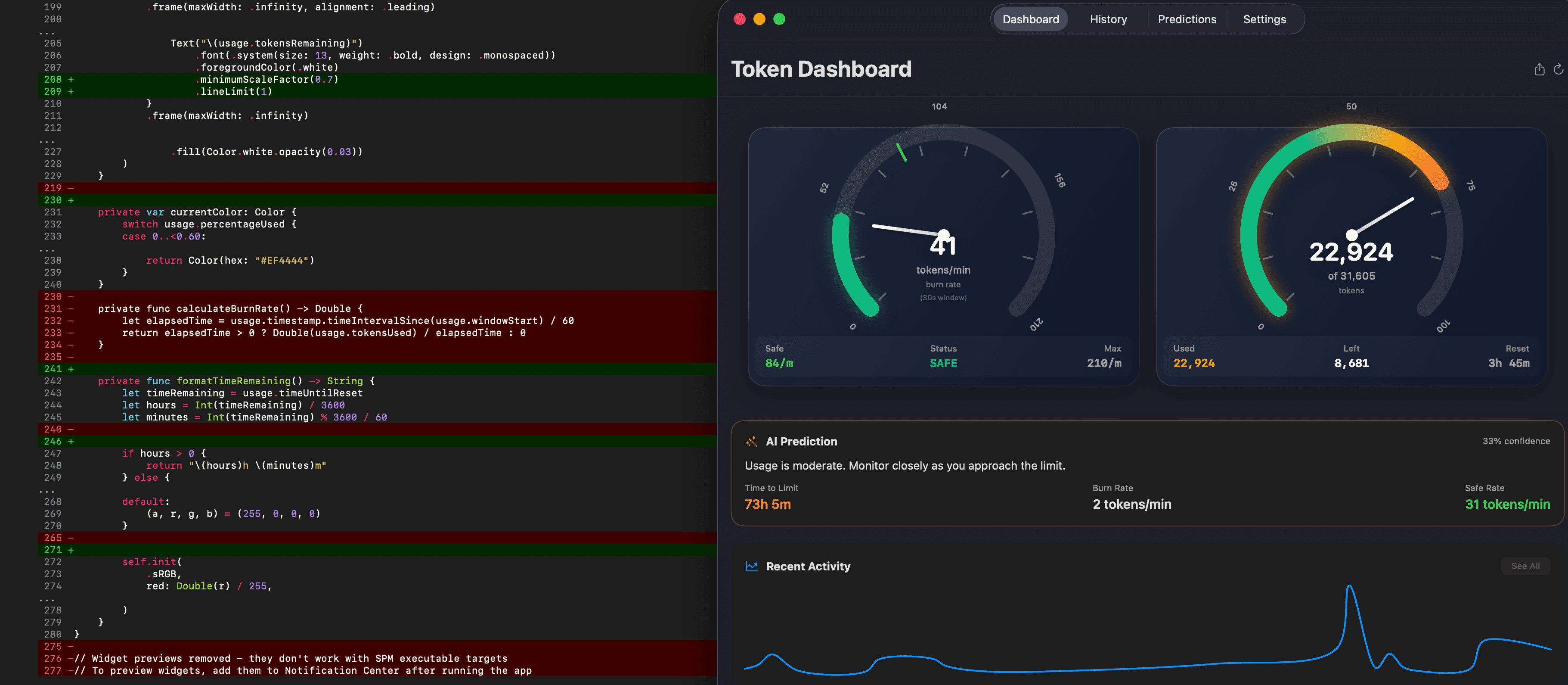
ClaudeGauge dashboard showing dual tachometer gauges, usage history, and AI predictions

Token count gauge (left), burn rate gauge (right), with usage history and AI predictions below

Token Count Gauge
Tachometer-style gauge showing current usage within your 5-hour window. Color-coded zones: green (under 50%), yellow (50–80%), red (approaching limit).
Burn Rate Gauge
Real-time tokens-per-minute indicator. See at a glance whether your current session is burning hot or cruising efficiently.
Usage Predictions
AI-powered trend analysis that forecasts when you’ll hit your limit at the current pace — so you can decide whether to keep going or save tokens for later.
Weekly History
Usage graphs showing consumption patterns over time. Identify which days and sessions are the heaviest and plan accordingly.
Desktop Widgets
Native macOS WidgetKit integration in small, medium, and large sizes. Pin to your desktop for always-on visibility without opening the app.
Zero Configuration
Reads usage data directly from local Claude Code session files (~/.claude/projects). No API keys, no setup — just build, run, and it works.
How It Works

Still works today

ClaudeGauge monitors token usage across Claude Code, Claude Co-work, claude.ai, and any other Anthropic-powered tool by reading local session data. It was built for the early days when this kind of observability didn't exist, but the tool still works well today.

The ecosystem has matured since then — there are now several good monitoring tools available. But ClaudeGauge was one of the first, born from the practical need to not get blindsided mid-session. It's a small example of something I do consistently: when the tool I need doesn't exist, I build it.

Quick Start
1
Clone the repo from GitHub
2
Open in Xcode, set your development team
3
Build and run (Cmd+R)
4
Right-click desktop → Edit Widgets → search "Anthropic Token"
Open Source
github.com/paulmm/AnthropicTokenWidget
View on GitHub